
AI That Works
While You Don't Have To
Every photo texted to your Qwikfolio number is moderated, enhanced, branded, and published by AI — in seconds, automatically. Here's what's working behind the scenes.
Crowd-sourced media needs a gatekeeper
When anyone can text a photo to your number, something has to make sure what shows up on the big screen is safe, polished, and on-brand. That gatekeeper is Qwikfolio's AI: every submission is analyzed the instant it arrives, so your slideshows, galleries, and presentations stay worry-free — no human review team required.
Real-Time Content Moderation
Best-in-class AI screens every image across 11 content-safety categories — including offensive text embedded inside photos — and holds flagged media out of every slideshow, gallery, PowerPoint, embed, and download. Flagged items stay blurred behind a tap-to-reveal until you decide, and you choose which categories apply to each number.
Automatic Enhancement
Clarity, color, cropping, and orientation are corrected the moment media arrives — every photo is display-ready without touching an editor. Set a collection to a fixed aspect ratio (1:1, 4:3, 16:9, 9:16, or none) so everything lands the same shape, and add #bw, #sepia, #vivid, #warm, or #cool to a message to apply a finish.
AI-Powered Search
AI identifies what's inside every photo — and reads the words on banners, jerseys, and signs — making your entire collection searchable. Find the cake cutting, the winning goal, or the sunset shot in seconds, even across thousands of submissions.
Smart-Stitch Layouts
Include #combine and several photos sent in one message become a single image — a professional collage, a multi-angle view, or a before-and-after frame. No Photoshop required.
Smart Video Highlights
Upload a video up to three minutes long and AI finds its strongest six seconds — favoring people, action, and good lighting — then trims it, sizes it for display, and saves a poster frame. It drops straight into slideshows and PowerPoints.
A Description for Every Photo
AI writes a plain-language description of every photo and video, shown on its detail page and included in webhooks — useful for captions, accessibility text, and your asset library.
Every photo explained, every decision visible
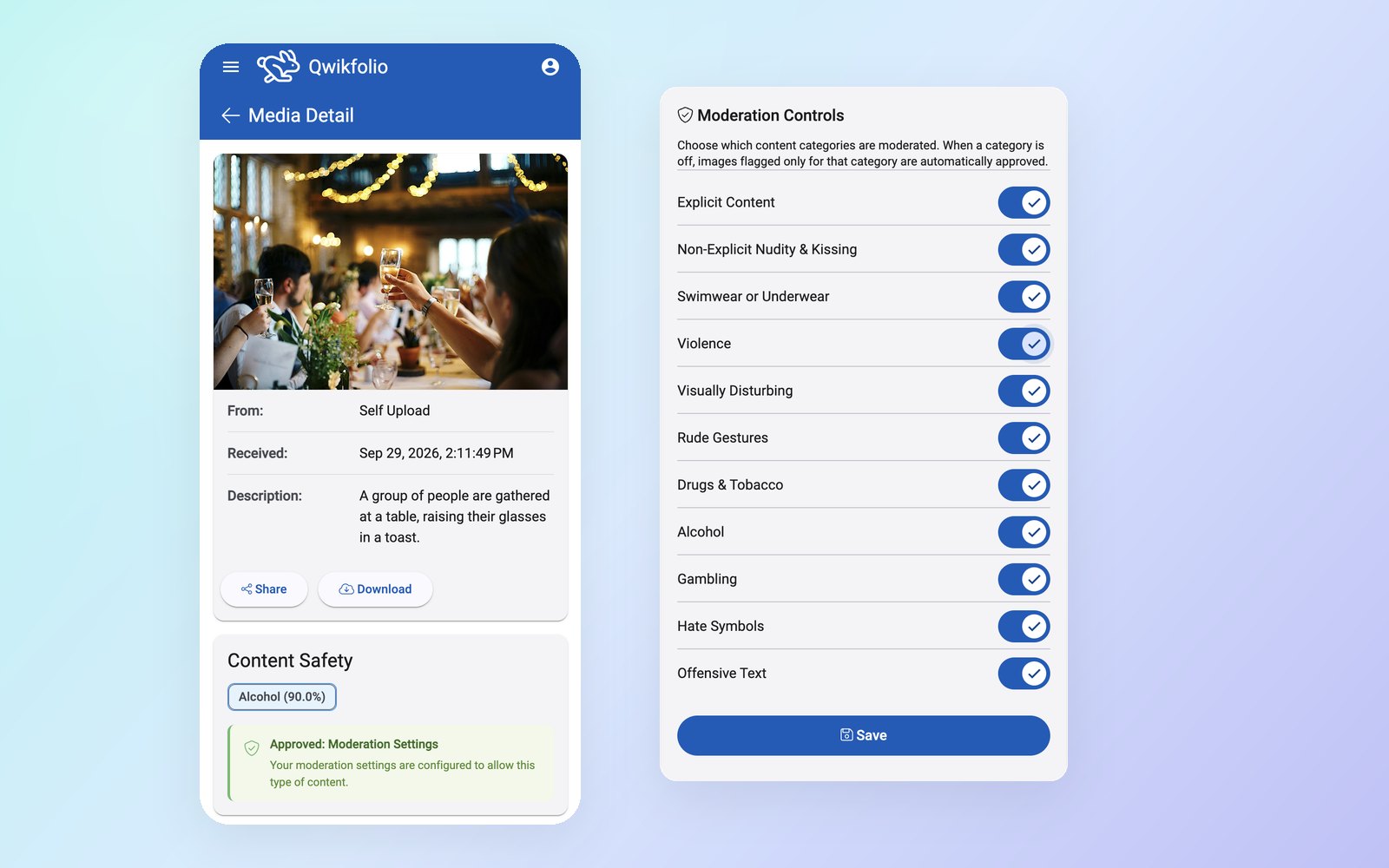
Open any item to see the AI's plain-language description and its content-safety results. Nothing is a black box — you can always tell why something was held and who let it through.
- AI description for every photo and video, written in plain language
- Content-safety results with a confidence score for each flag
- Clear approvals — see whether you, your reviewer, or your moderation settings approved it
- Your rules — switch any of the 11 categories on or off for each number, any time
The AI pipeline, start to finish
Received → AI-moderated → enhanced, captioned & branded → published to your slideshow, gallery, embeds, and webhooks. Every step is automatic and happens in seconds — contributors text a photo, and it's on your display before they've put their phone away.
Explore All FeaturesYour media stays yours
Qwikfolio's AI processes your media solely to provide the service — moderation, enhancement, and display. Your content is never sold and never used to train AI models. See our Privacy Policy.
FAQs
How does Qwikfolio use AI?
Qwikfolio uses AI at every step between a text message and a finished presentation: content moderation scans every incoming photo (including text embedded inside images) in real time, image enhancement automatically corrects clarity, color, and cropping, object detection makes your entire gallery searchable by what’s inside the frame, video is trimmed to its strongest six seconds with audio removed, and smart-stitch merges several photos sent in one message into a single collage or before-and-after frame when you include “#combine” in the text.
What is AI content moderation and why does it matter?
AI content moderation automatically reviews every photo and message the moment it arrives and excludes anything inappropriate before it can appear in your slideshows, galleries, PowerPoints, or downloads. It screens eleven categories — explicit content, non-explicit nudity, swimwear or underwear, violence, visually disturbing content, rude gestures, drugs and tobacco, alcohol, gambling, hate symbols, and offensive text inside images — and each category can be switched on or off per number. For public displays — a wedding slideshow, a school yearbook feed, a resort lobby screen — this protection is essential, and Qwikfolio provides it without expensive human review.
Can AI moderation make mistakes?
No automated system is perfect, which is why Qwikfolio pairs AI moderation with easy manual review. Flagged items are held out of every output, and you (or a designated reviewer, like a family member for a memorial service) can approve or reject them from any device.
How does AI handle video?
When a video is uploaded, AI reviews it and picks the most engaging six-second window — preferring people, action, and good lighting. Qwikfolio trims the clip to that moment, sizes it for display, and saves a poster frame. AI also writes a description and tags so the video is searchable, and it goes through the same moderation as photos.
Does AI moderation slow down my media?
No. Moderation, enhancement, and branding all happen in seconds — approved media appears in your live slideshows, galleries, and embeds in real time.
Is my media used to train AI models?
No. Your media is processed solely to provide the service to you — moderation, enhancement, and display. See our Privacy Policy for details on how your data is handled.
Claim Your Private Number Now
Start collecting media in minutes. No apps for your contributors, no limits on what they send.
Get StartedGet in Touch
Questions about Qwikfolio? Send us a message below — we're here to help.